AI Video Editor - Vidma Cut AI
- 4.6
- Rating
- 50.00M
- Installs
- Free
- Price

 Analysis by App-foxy
I approached Vidma Cut AI as the kind of editor people open when a phone video needs to become something shareable without turning into a full production project. It is a free video-editing app from Vidma Video Studio, aimed at making clips, music-led edits, and AI-styled images feel accessible on a mobile screen. After spending time with it, my impression is that its appeal comes from speed and visual variety rather than deep, professional control.
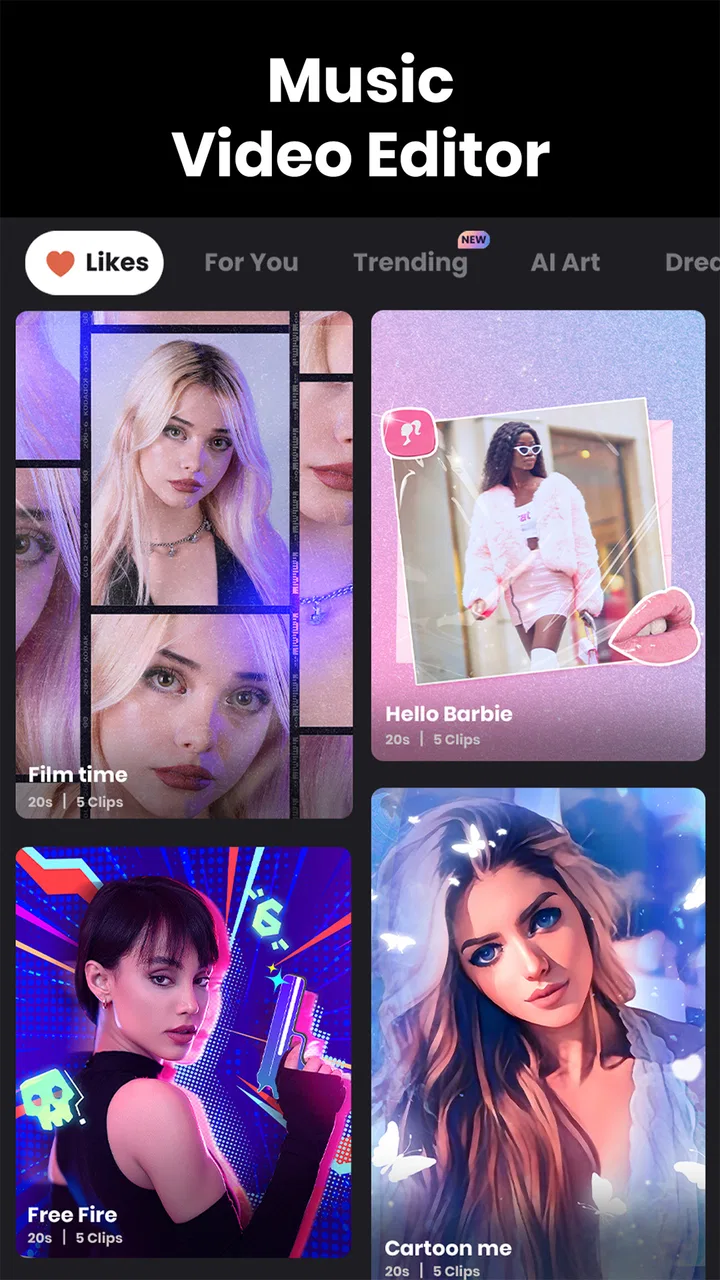
The app sits in the video players and editors category, but its personality is closer to a quick content-making toolbox. You can start with ordinary phone footage, experiment with music and visual treatments, and shape the result for social sharing or personal memories. The store summary highlights AI video editing, video making, and viral AI-style images, while the short description presents it as Vidma Cut AI. In practical terms, I found that the app makes the first creative step easy, although the later stages still require patience and a little organization.
Where the first edit can become confusing
The biggest friction is not necessarily the editing itself. It is deciding what you want the project to be before adding clips, music, and effects. If I opened the app with a vague idea such as “make something nice from this weekend,” I could easily spend more time browsing possibilities than actually finishing the video. The AI-oriented tools and ready-made visual direction encourage experimentation, but that can also make a simple edit feel larger than it needs to be.
You May Also Like

 Blood Strike: 2.5 Anniversary
Blood Strike’s Loadouts Turn Every Drop Into a Tactical Gamble
A close look at Blood Strike’s custom loadouts: how fast access to signature weapons reshapes its battle royale rhythm, rewards preparation, and narrows the gap between fights.

 Pandora - Music & Podcasts
Pandora’s Music Is Easy to Start, but Harder to Recover
Pandora’s strength is its low-effort path from a seed to a station. Its weak spot is how much confidence it asks you to place in connection, setup, and quiet recovery.

 8 Ball Pool
 Is Built on Rivalries, Rematches, and Routine
A close look at the rivalries, rematches, shared routines, and unanswered safety questions that turn a quick pool match into a persistent mobile community.

 Samsung Music
’s Quiet Strength Is Playing What You Already Own
Its reach comes less from spectacle than from dependable access to a personal library. That simplicity is both the app’s strongest retention engine and its ceiling.

 AccuWeather: Weather Radar
AccuWeather Review: A Quick, Clear Forecast for Everyday Decisions
For everyday plans, the best forecast is the one you can understand quickly. AccuWeather makes rain timing, radar, and local conditions easy to act on, with a few trade-offs.

 Hill Climb Racing
Why Hill Climb Racing Still Turns Crashes Into One More Run
A tiny car, a bumpy hill and one more upgrade: Hill Climb Racing keeps resurfacing because its simple chaos makes every near-miss feel personal.
More From Our News Desk



I recommend beginning with a narrow goal: a short recap, a music-backed montage, a before-and-after clip, or a single image treatment. This matters because every extra element creates another decision about timing, transitions, text, and visual style. Vidma Cut AI is most comfortable when I treat it as a focused mobile editor rather than an unlimited creative studio.
Another common sticking point is the difference between selecting a style and completing a polished result. A striking AI treatment can attract attention immediately, but it may not suit every source image or video. Faces, lighting, backgrounds, and the original composition all affect whether the result feels intentional. I learned to preview a few options before committing to one, instead of assuming that the most dramatic effect would also be the most useful.
The practical lesson is to separate discovery from finishing. I first collect the clips and decide on the mood, then I return to effects and music. This simple order reduces the temptation to rebuild the project repeatedly whenever a new style catches my eye.
What the app is best at
For quick personal videos, the app has a clear advantage over a traditional desktop editor: it keeps the whole process close to the footage already on my phone. A parent making a short birthday montage, a traveler assembling a few memorable scenes, or a small creator preparing a casual vertical post can get moving without learning a complicated timeline.
It is also a good fit for people who want a visual starting point. Instead of beginning with an empty project and manually designing every detail, I can use the app’s AI-focused direction to explore a look and then judge whether it fits the material. That is especially useful when I have more enthusiasm than editing experience.
However, I would not choose it first for a carefully controlled film project. If exact audio mixing, detailed color work, frame-level precision, or a highly repeatable professional workflow is the priority, a more advanced editor is likely to be a better match. Vidma Cut AI favors immediacy, and immediacy always involves some compromise in control.
Setup checks that prevent avoidable trouble
Before blaming the app for a failed import or an awkward preview, I check the basics. I make sure the phone has enough free storage for temporary project work, that the original media can be opened normally in the device’s gallery, and that the app is allowed to access the media I intend to use. These are ordinary checks, but they prevent a surprising amount of confusion.
The application supports devices running Android 9 or later. That makes it accessible to many existing Android phones, but compatibility alone does not guarantee a smooth experience with every large or demanding project. Older hardware may take longer to process visual effects, and a busy phone can make preview playback feel less responsive. I prefer to close other demanding apps before working on a project with several clips or AI-style processing steps.
I also prepare the source material before importing it. I remove duplicate clips, mark the strongest moments, and decide whether the final video should be wide or vertical. Doing this outside the editor saves time inside it. It also makes the creative choices clearer because I am not trying to rescue every piece of footage at once.
Music deserves an early check as well. I listen to the selected track from beginning to end and decide where the important visual changes should happen. If I simply add music first and cut randomly afterward, the finished video can feel busy even when the individual clips look good. A short opening, a clear middle, and a deliberate ending usually work better than filling every second with a new effect.
How I prepare a reliable project
My preferred setup is modest. I create a small working folder containing the chosen clips and any images I might use, then I start with the shortest realistic version of the idea. If the first cut works at a compact length, I can extend it later. Starting with an oversized project makes it harder to tell whether the problem is the concept, the source footage, or the editing choices.
I keep the original files untouched and treat the app project as a separate working copy. That is useful when testing AI styles or changing the order of scenes because I can return to the source material without losing anything. It also makes it easier to compare a natural edit with a more stylized version.
When a tool appears not to respond, I avoid tapping repeatedly. I wait briefly, check whether the preview has caught up, and then try a smaller test with one clip or one image. This is a safer way to identify whether the issue is connected to a particular file or to the project as a whole. It also prevents accidental duplicate actions that can make the timeline harder to understand.
Understanding the cost before committing
Vidma Cut AI is free to install and use, with optional in-app purchases ranging from $0.49 to $89.99 per item. I would not begin a project assuming that every creative option belongs to the free experience. Instead, I check the screen around any premium-looking style or asset before spending time building an edit around it.
This is particularly important when an effect becomes the foundation of the entire video. If the look is central to the idea, I test it early and confirm what happens at the export stage before refining every cut. That workflow avoids the frustrating situation of completing a project and only then discovering that the preferred treatment requires an additional purchase.
The app is rated for Everyone, which makes it approachable for a broad audience, but that does not mean every editing decision is automatically suitable for every viewer or platform. I still review the final video myself, especially when using dramatic AI transformations or combining personal images with music.
Recovering a workflow when something goes wrong
When an import fails, I first test the same project with a different clip. If the replacement works, the original file may be the source of the trouble rather than the editor. I then check whether the clip plays correctly outside the app and whether a shorter version behaves more reliably. This does not solve every technical problem, but it gives me useful information instead of encouraging random changes.
If the timeline becomes difficult to manage, I save the creative idea in stages. I make a basic cut without decorative effects, review it, and only then add music or AI styling. This staged approach is one of the most useful habits I found with the app. It means that a problem introduced by an effect does not force me to question the entire edit.
For a video that feels slow, I do not immediately add more transitions. I remove repeated moments first. A shorter sequence with stronger clips usually benefits more than a longer sequence packed with movement. Vidma Cut AI can make visual experimentation easy, but restraint is still what gives a casual mobile edit a finished feeling.
For a video that feels flat, I change the order of the clips before reaching for another filter. Opening with the clearest action or most expressive image gives the viewer a reason to continue watching. I use effects to support that structure, not to compensate for footage that has no clear progression.
A realistic everyday workflow
Imagine I have recorded a family day out: a few short walking shots, a meal, a landscape, and one group photo. I would begin by selecting only the clips that show a change of place or mood. I would place the strongest image near the beginning, use the walking footage to establish movement, and reserve the group photo for the closing moment.
Next, I would choose music that matches the pace rather than trying to make every cut dramatic. I would preview the sequence without heavy styling, shorten any shot that repeats information, and then test one AI-inspired visual treatment on the image or on a brief segment. If the effect distracts from the people or location, I would remove it instead of forcing it into the edit.
Finally, I would watch the complete result once without editing. That last uninterrupted viewing often reveals issues that are easy to miss while working: an abrupt ending, a clip that stays too long, or a visual change that arrives before the music is ready for it. This workflow uses Vidma Cut AI for speed while keeping the creative judgment with me.
When the app is not the cause
Some disappointing results come from the source material. A shaky recording, very dark image, or heavily compressed clip may remain imperfect after editing. AI styling can change the appearance, but it cannot reliably turn every weak source into convincing footage. I get better results when I choose clear, well-lit material and use effects selectively.
Storage and device workload can also be misleading. A project may appear to freeze when the phone is busy with other tasks or when the media collection is unusually large. I reduce the project to a small test, close unnecessary apps, and make sure the device has room to work. If the small test behaves normally, I rebuild the larger edit in sections rather than assuming the whole app is broken.
There is also a platform issue that editing apps cannot solve: a finished video may look different after being posted elsewhere. Social platforms can resize or recompress video, and their playback environments may alter how sharp details, text, or fine effects appear. I therefore keep text readable, avoid placing important details at the extreme edges, and review the exported file itself before sharing it.
Compared with a basic gallery editor, Vidma Cut AI offers a more creative route through music, visual treatments, and AI-led experimentation. Compared with a professional mobile editor, it asks me to surrender some fine-grained control in exchange for a quicker path to a presentable result. That trade-off is not a flaw for casual users; it becomes a limitation only when precision matters more than convenience.
I would also skip it if my main goal is simply trimming a clip and sending it immediately. The extra creative options can be unnecessary for that task. A built-in phone editor may be faster when all I need is a clean beginning and ending. On the other hand, if I want a more expressive montage without learning a dense interface, Vidma Cut AI has a stronger reason to be installed.
My practical verdict after using it
Vidma Cut AI is a friendly choice for mobile creators who want to turn ordinary footage into something more visual without starting from a blank professional timeline. Its strongest qualities are approachability, quick experimentation, and the ability to combine everyday video-making with AI-style image ideas. I especially like it for short personal edits where mood and momentum matter more than exact technical control.
Its weaknesses are connected to the same design. The range of creative possibilities can distract from a simple goal, processing may feel less comfortable on a busy or older phone, and users should pay attention to which options may involve purchases. The app works best when I prepare my media, test important effects early, and build the project in stages.
Vidma Video Studio has made an app that is easy to understand at the starting line, but the best results still come from making deliberate choices. With a 4.6 average from around 387 thousand ratings and more than 50 million installs, it has clearly reached a large audience. The current version is 2.27.0, and its release history began in January 2022, giving it an established place among mobile editing tools.
For someone who wants a free starting point for music-led videos, quick montages, and playful AI visual experiments, I would recommend trying it. I would not present it as a replacement for a full professional editor, nor as the fastest answer for a simple trim. My final advice is to begin with one small project, verify the look and export path before investing serious time, and judge the app by whether it helps you finish—not merely by how many effects it offers.
FAQs for AI Video Editor - Vidma Cut AI
01What features does AI Video Editor - Vidma Cut AI offer?
AI Video Editor - Vidma Cut AI provides a range of features including automatic video editing, AI-driven effects, and transitions. It allows users to easily trim and merge clips, add music, and apply filters to create professional-looking videos. The app is designed for both beginners and experienced editors, ensuring a smooth editing experience.
02Is AI Video Editor - Vidma Cut AI user-friendly for beginners?
Yes, AI Video Editor - Vidma Cut AI is designed with a user-friendly interface that caters to beginners. It offers intuitive controls and guided tutorials to help new users navigate the editing process. The AI features simplify tasks by automating complex editing steps, making it accessible even to those with no prior editing experience.
03Does AI Video Editor - Vidma Cut AI support 4K video editing?
AI Video Editor - Vidma Cut AI supports 4K video editing, allowing users to work with high-resolution footage. This feature ensures that your videos maintain high quality and clarity, which is essential for professional projects. However, users should ensure their device is capable of handling 4K editing to avoid performance issues.
04Are there any in-app purchases in AI Video Editor - Vidma Cut AI?
AI Video Editor - Vidma Cut AI offers a free version with basic features, but also includes in-app purchases for additional functionalities. Users can opt for premium features such as advanced effects, transitions, and enhanced AI tools. These purchases can enhance the editing experience, though the free version is sufficient for standard editing tasks.
05How does AI Video Editor - Vidma Cut AI handle privacy and data security?
AI Video Editor - Vidma Cut AI prioritizes user privacy by implementing robust data security measures. The app does not store or share personal videos without user consent. It follows industry-standard encryption protocols to protect user data, ensuring that your information remains secure during the editing and sharing process.
Pros
- Intuitive interface for beginners.
- Fast processing with AI enhancements.
- Wide range of editing tools.
- Supports multiple video formats.
- Regular updates with new features.
Cons
- Limited free version capabilities.
- Occasional AI errors in complex edits.
- High-quality exports require subscription.
- Heavy battery usage during editing.
- Needs a stable internet connection.

AI Video Editor - Vidma Cut AI
Gallery